
Spotify Messages: Who Can DM You, What Others See, and How to Turn It Off
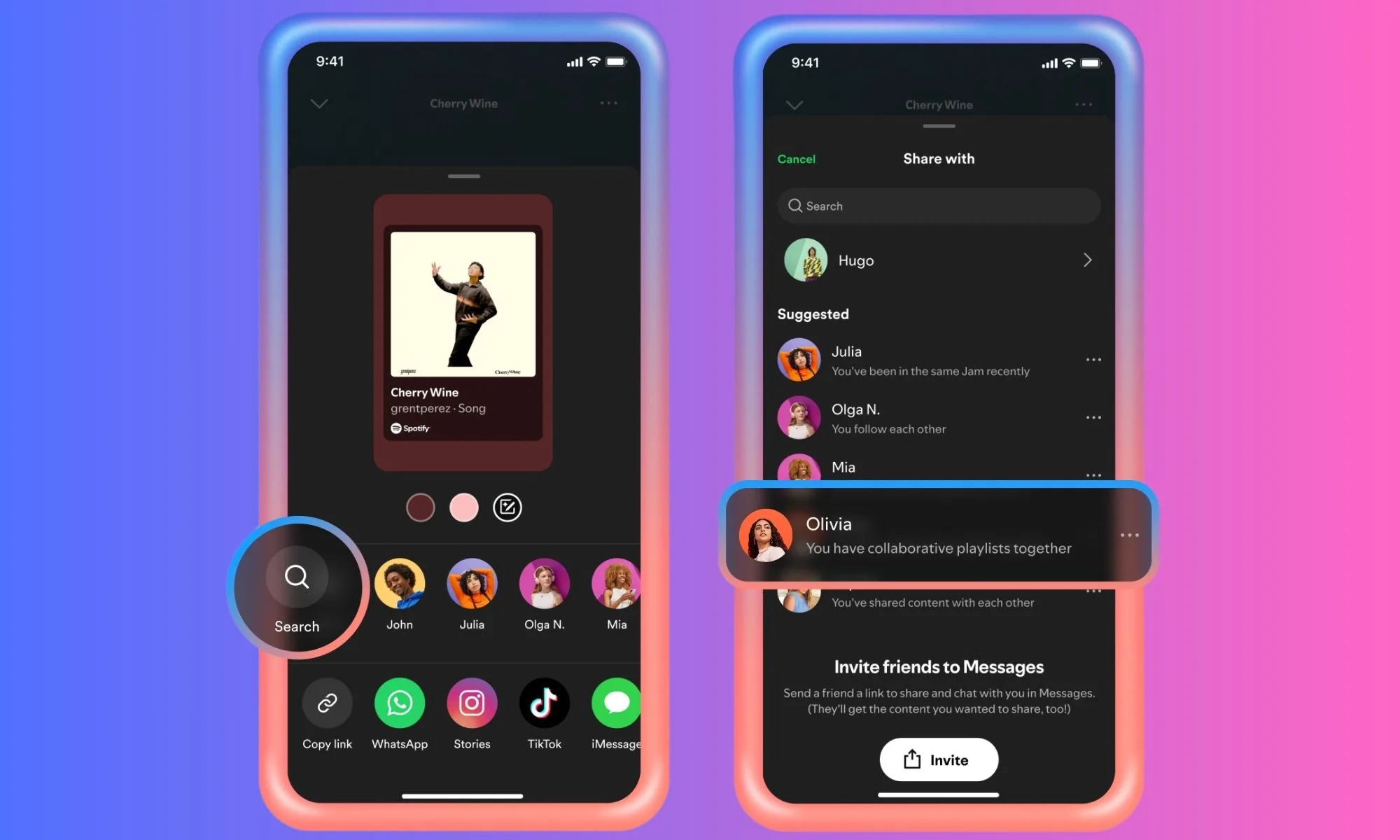
Spotify has had direct messages since August 2025. If you share a lot of songs, they're handy. If you'd rather your music app stayed a music app, you might want to know who can reach you there, what they can see, and where the off switches are.
This guide covers all three parts of it: Messages itself, Listening Activity (your friends' current song, shown inside your chats) and Request to Jam.
What Spotify Messages is
Spotify launched Messages on August 26, 2025 as a way to send songs, podcasts and audiobooks to people without leaving the app. It's on the mobile app, for Free and Premium users, and you have to be 16 or older to use it. It rolled out market by market, so it may not be in your country yet.
You open it by tapping your profile picture, then Messages. From there you can start a new chat or create a group.
Who can message you
You can't search for any Spotify user and DM them. Spotify's Messages help page says it suggests people you've already interacted with on Spotify, such as people who:
- shared Spotify content with you before, or you with them
- made a Blend or a collaborative playlist with you
- were in a recent Jam with you
- share a Family or Duo plan with you
The first time someone messages you, it arrives as a message request. You can accept it, delete it, or block the person.
The share-link catch: what ?si= does
When you tap Share and copy a link to a song, the link ends with something like ?si=8dyy8ff75d4a4fa8. That code is unique to the share. When people click it, Spotify can connect the person who shared the link with the people who opened it.
When Messages launched, users found that this is how some suggestions appear. As Digital Music News reported in September 2025, if you post a Spotify link in a Discord server or a group chat under a nickname, people who click it can later see you suggested as a contact, with your Spotify display name and profile picture.
To share a link without that code, delete everything from the ? onward before you paste it:
- With the code:
https://open.spotify.com/track/0PsBajvo0g7bLLHxwH3Sk0?si=8dyy8ff75d4a4fa8 - Without it:
https://open.spotify.com/track/0PsBajvo0g7bLLHxwH3Sk0
The second link opens the same song. It's also worth checking what your Spotify display name and profile picture say about you, since that's what a suggested contact sees.
Are Spotify Messages private?
Private between the people in the chat, but not end-to-end encrypted. Spotify's help page puts it plainly: "Spotify Messages are private between participants but are not encrypted." The launch post says conversations are encrypted in transit and at rest, which protects them on the way and in storage, and that Spotify uses detection technology to scan messages for certain unlawful and harmful content, with moderators reviewing reported messages.
So treat it like any other app's DMs that the company can read: fine for "you need to hear this", not the place for anything sensitive.
Listening Activity: your current song, inside your chats
On January 7, 2026, Spotify added Listening Activity to Messages. When it's on, people you already chat with can see what you're playing right now, or your most recent song if you're not listening. It shows next to your chat and at the top of the conversation, and they can tap it to play the song, add it to a playlist or react with an emoji.
Spotify called it opt-in when it launched. But the same Listening activity switch also feeds the older Friend Activity view, and Spotify's privacy controls page lists that setting as on by default for users 18 and over. Check yours rather than assuming.
To turn Listening Activity off on your phone (Spotify's steps):
- Tap your profile picture.
- Tap Settings and privacy.
- Tap Privacy and social.
- Switch Listening activity off.
On desktop: click your profile picture, then Settings, and switch it off under Listening Activity and insights. The same page lets you pick who can see your activity, and group chats have their own setting. The setting applies on all your devices.
If you only want to hide it for a while, a Private session turns your listening activity off for six hours.
Request to Jam
The same update added a Jam button in chats. Tap it and the other person gets a request to start a Jam, a shared queue you both add songs to and listen to at the same time, even if you're in different places.
A few details from Spotify's announcement:
- You need Premium to send a request.
- If they accept, the person you asked becomes the host of the Jam.
- Free users can join a Jam when a Premium user hosts it.
How to turn off Spotify Messages
If you don't want DMs at all (Spotify's steps):
- Tap your profile picture.
- Tap Settings and privacy.
- Tap Privacy and social.
- Scroll to Social features and switch Messages off.
Want to keep Messages but stop the pings? Go to Settings and privacy, then Notifications, Social features, Messages, and switch notifications off.
How to block or report someone
Block: open the chat, tap the header with the person's name and picture, tap the three dots, choose Block user and confirm. You can see and undo blocks in Settings and privacy, then Privacy and social, then Blocked users.
Report: press and hold the message, tap Report, and choose how it breaks Spotify's rules. Spotify says its moderators review reported content.
Quick privacy checklist
- Switch Messages off if you don't want DMs.
- Check that Listening activity is set the way you want, and who can see it.
- Remove
?si=from links you post publicly. - Look at your display name and profile picture: that's what suggested contacts see.
Frequently asked questions
Can strangers message me on Spotify?
Not freely. Spotify suggests people you've interacted with, like people you've shared with or Jammed with, and anyone's first message lands as a request you can accept, delete or block. Clicked share links can also create those connections, which is why it's worth removing ?si= from links you post publicly.
Are Spotify Messages end-to-end encrypted?
No. Spotify says they're private between participants but not encrypted, and it scans messages for certain unlawful and harmful content.
Can people see what I'm listening to in Messages?
Only if Listening activity is on, and only people you already chat with see it in Messages. Switch it off under Settings and privacy, then Privacy and social.
Does a Private session hide my listening from my friends?
Yes, for six hours or until you restart the app. It also keeps that listening out of your recommendations and your Wrapped.
Is Request to Jam free?
Starting one needs Premium. Free users can still join a Jam a Premium user hosts.
How do I delete Spotify Messages completely?
Switch Messages off under Settings and privacy, then Privacy and social, then Social features.
Curious what your own listening looks like? Your Spotify extended streaming history shows every play, with dates and times, and you can see what it reveals without sending it anywhere.
Insight Tool
See your Spotify listening, privately
Upload your extended streaming history and see your top artists, songs and habits. Free, no account, and your history never leaves your device.