How to Get Your All-Time Spotify Wrapped (2026 Guide)
What's your most-played song of all time on Spotify? Not this year. Ever.
Spotify won't tell you. Every Wrapped covers one year, and once the next one comes out, the old one is just a memory and a few screenshots. There's no button for an all-time Wrapped.
But the data exists. Spotify keeps a record of every song you've played since you opened your account, and you can ask for a copy for free. That record is your all-time Spotify Wrapped, and this guide shows you how to get it and what's inside.
Why Spotify doesn't have an all-time Wrapped
Wrapped is built as a once-a-year moment. It counts your listening from January 1 until around mid-November, then comes out in early December. Next year starts from zero.
Inside the app, the only other stats you get are Listening stats, which show your top artists and songs from the past four weeks. Useful for a quick check, but four weeks is the opposite of all time.
What Spotify does give you is your data. Its Extended streaming history covers what you've played during the lifetime of your account. That's the file you need.
How to get your all-time Spotify Wrapped
1. Request your Extended streaming history
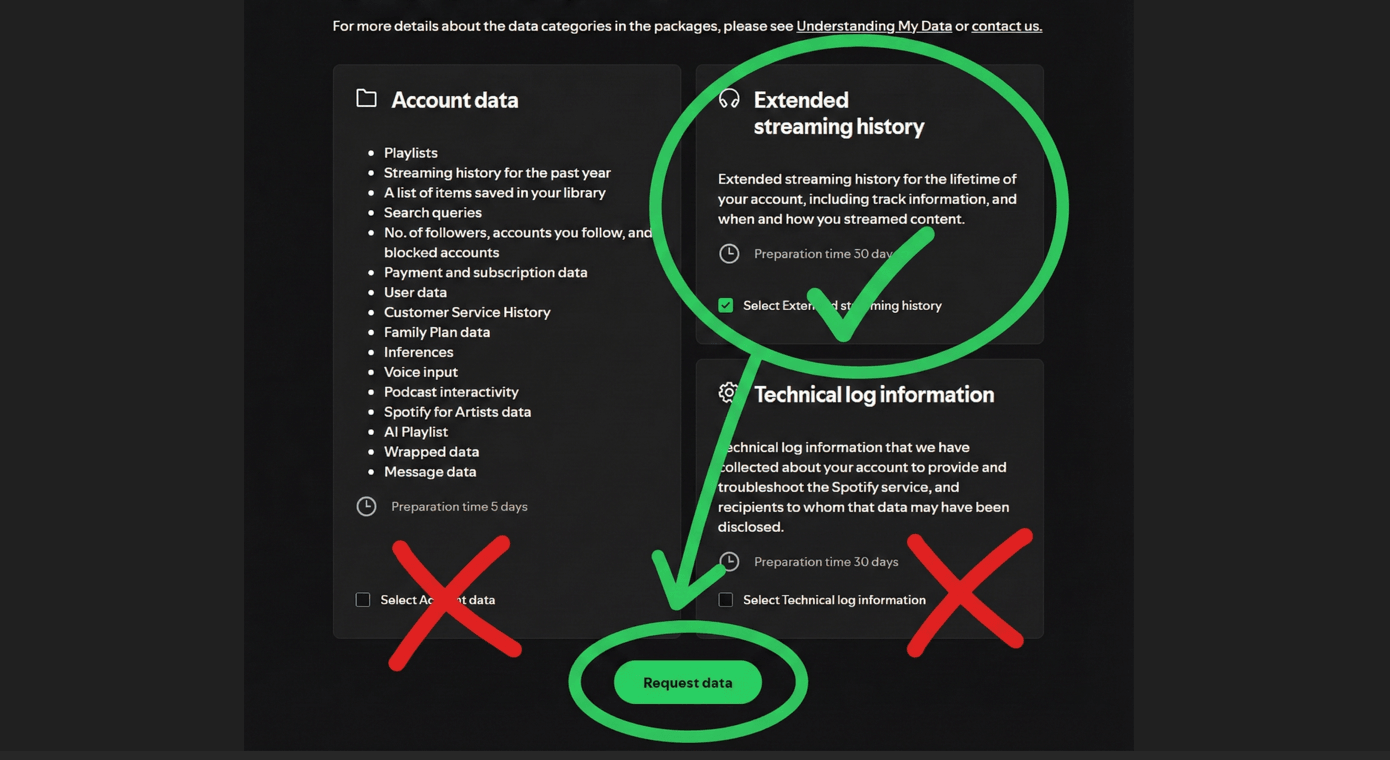
Log in to your Spotify account privacy page on a browser and scroll down to Download your data. You'll see three options:
- Account data: only has your streaming history for the past year. Untick it.
- Extended streaming history: your whole history, from the day you made your account. Tick this one.
- Technical log information: not needed. Untick it.
Then press Request data.
2. Confirm the email
Spotify sends you an email to confirm the request. Open it and tap the confirm button, or nothing happens.
3. Wait for the ZIP
The page lists the preparation time for the extended history as up to 30 days. It often arrives sooner, but there's no way to speed it up, so request it now. When it's ready, Spotify emails you a download link for a ZIP file.
The full walkthrough, with what to do if the email doesn't show up, is in our Spotify extended history guide.
4. Upload it to mystats.music
Drop the ZIP on the Spotify import page. Don't unzip it. It's free, there's no account, and you don't log in with Spotify. Everything is worked out in your browser: your listening history isn't uploaded anywhere.
What you'll see in your all-time Wrapped
The timeframe picker starts on all time. Here's what's waiting for you.
Your all-time #1s
Your top songs, artists and albums of all time, fully ranked, with how many times you played each one and how long you spent listening. See how it looks on the demo: top songs, top artists and top albums.
A Wrapped for every year
The years page lines up every year you've had Spotify, each with its top artist, top song and total listening time. Open one and you get a full year in review: like the Wrapped from years ago you forgot to screenshot.
Your artist storyline
This is the part no yearly recap can do. Your storyline reads your whole history and splits it into nine chapters: when your favorites arrived, what's new this year, discovery waves, long-term favorites, one-song crushes, comebacks, short flings, the artists you left behind and when you moved on.
When and where you listen
A heatmap of when you listen by hour and weekday, your longest streak and your longest session. A map of where you listened, country by country. And your listening history, day by day, so you can pick any date and see what you played.
Share it
Found something good? Turn it into a share card for your story.
How it's different from your yearly Wrapped
Your all-time stats come from the same listening data Spotify keeps for your account, so expect familiar names. A few things work differently:
- The time range. Wrapped counts January 1 to around mid-November, and Spotify doesn't publish the exact cutoff. Your export covers every year, right up to the day you requested it. More on that in when Wrapped 2026 comes out.
- Short plays. On mystats, a play counts once you've listened for more than 30 seconds, the same line Spotify uses.
- Sleep and focus sounds. White noise, rain and sleep tracks are left out by default, so they don't take over your top songs. You can switch them back on.
- Private sessions. Wrapped's top lists ignore private-mode listening. Your export still includes those plays, so they count here.
- Podcasts. Your file includes podcast episodes, but mystats leaves them out so your rankings are all music.
- Ranking. Songs and artists are ranked by number of plays, with listening time breaking ties. No weighting, no surprises.
All-time Wrapped vs Spotify's Listening stats
- Listening stats: in the app, instant, last four weeks only, top artists and songs.
- All-time Wrapped from your export: takes a data request, but covers your whole account, every year, with albums, play counts, listening time and habits.
Use Listening stats to see what you're into right now. Use your export to see who you've been all along.
Getting ready for Wrapped 2026?
The same export shows your year so far. Pick this year in the timeframe picker for an early look at your Wrapped, and if you don't like what you see, here's how to fix your Wrapped before the cutoff.
Frequently asked questions
Is there an all-time Spotify Wrapped?
Not from Spotify. Wrapped only covers one year at a time. Your Extended streaming history covers your whole account, and mystats turns it into all-time rankings.
How far back does it go?
To when you opened your Spotify account. Spotify describes the Extended streaming history as covering the lifetime of your account.
Is it free and safe?
Requesting your data from Spotify is free, and so is mystats. Your file is read in your browser and never uploaded to a server. mystats keeps your stats in your own browser for 90 days so they open straight away next time, and you can forget them any time. See our privacy page.
Does it include podcasts?
Spotify's file does, but mystats leaves podcast episodes out of your stats, so your top lists are songs, artists and albums.
Why can't I just use the Account data download?
It only covers your streaming history for the past year. For all-time stats you need Extended streaming history.
Can I see my old Wrapped years?
Yes. Every year in your history gets its own page with your top songs, artists and albums.
No data yet? Have a look around the stats preview while you wait.
Insight Tool
Your all-time Spotify Wrapped
Got your Extended streaming history ZIP? See your top songs, artists and albums of all time, and every year since you joined.